放大镜不跟随鼠标,无法退出放大
回复内容
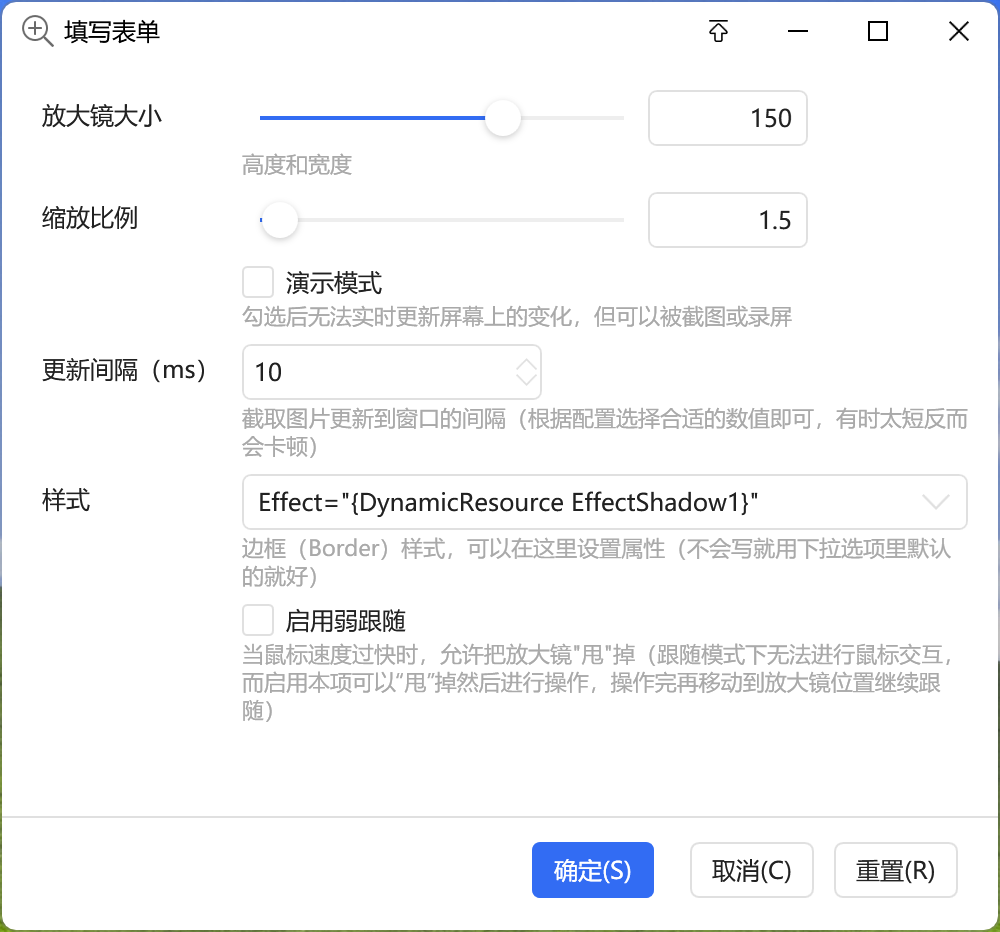
辅助C#代码改为以下,问题解决
using System.Windows;
using System.Windows.Input;
using System.Windows.Media.Imaging;
using System.Runtime.InteropServices;
using System.Windows.Threading;
using System.Windows.Media;
using System.Collections.Generic;
using Quicker.Public;
using System.Windows.Interop;
using Bitmap = System.Drawing.Bitmap;
using Rectangle = System.Drawing.Rectangle;
public static WriteableBitmap wb;
public static ImageBrush ib;
public static Window win;
public static int r;
public static bool shouldFixed;
public static Bitmap screen;
// 【新增】用于存储屏幕缩放比例
public static double dpiScaleX = 1.0;
public static double dpiScaleY = 1.0;
public static void OnWindowLoaded(Window w, IDictionary<string, object> d, ICustomWindowContext c)
{
win = w;
// 【新增】获取当前屏幕的DPI缩放比例(解决4K屏漂移的核心代码)
var source = PresentationSource.FromVisual(win);
if (source != null)
{
dpiScaleX = source.CompositionTarget.TransformToDevice.M11;
dpiScaleY = source.CompositionTarget.TransformToDevice.M22;
}
screen = CaptureScreen();
ib = (ImageBrush) win.FindName("ib");
var st = (ScaleTransform) ib.Transform;
r = Convert.ToInt32(d["r"]);
shouldFixed = Convert.ToBoolean(d["shouldFixed"]);
int interval = Convert.ToInt32(d["interval"]);
bool weakFollow = Convert.ToBoolean(d["weakFollow"]);
double minScale = 1.3;
win.PreviewMouseWheel += (s, e) =>
{
st.ScaleX = Math.Min(Math.Max(st.ScaleX + e.Delta / 120, minScale), 10);
st.ScaleY = Math.Min(Math.Max(st.ScaleY + e.Delta / 120, minScale), 10);
};
win.MouseMove += (s, e) =>
{
var mousePosition = win.PointToScreen(e.GetPosition(win));
// 【修改】除以缩放比例
win.Left = (mousePosition.X / dpiScaleX) - r;
win.Top = (mousePosition.Y / dpiScaleY) - r;
};
if (!shouldFixed)
{
ExcludeFromCapture();
}
if (!weakFollow)
{
win.Closed += (s, e) =>
{
GlobalMouseHook.Unhook();
screen.Dispose();
};
GlobalMouseHook.SetHook();
}
var dispatcherTimer = new DispatcherTimer() { Interval = TimeSpan.FromMilliseconds(interval), };
dispatcherTimer.Tick += (s, e) =>
{
try
{
var leftTop = win.PointToScreen(new Point(0, 0));
var rightBottom = win.PointToScreen(new Point(win.Width, win.Height));
var bm = Snapshot((int)leftTop.X , (int)leftTop.Y , (int)(rightBottom.X - leftTop.X), (int)(rightBottom.Y - leftTop.Y));
var wb = BitmapToWriteableBitmap(bm);
ib.ImageSource = wb;
bm.Dispose();
}
catch
{
dispatcherTimer.Stop();
win.Close();
}
};
dispatcherTimer.Start();
}
public static Bitmap Snapshot(int x, int y, int width, int height)
{
Bitmap bitmap = new Bitmap(width, height, System.Drawing.Imaging.PixelFormat.Format32bppArgb);
Bitmap croppedImage = new Bitmap(width, height);
using (System.Drawing.Graphics graphics = System.Drawing.Graphics.FromImage(croppedImage))
{
if (shouldFixed)
{
graphics.DrawImage(screen, new Rectangle(0, 0, width, height), x, y, width, height, System.Drawing.GraphicsUnit.Pixel);
}
else
{
graphics.CopyFromScreen(x, y, 0, 0, new System.Drawing.Size(width, height), System.Drawing.CopyPixelOperation.SourceCopy);
}
}
return croppedImage;
}
public static Bitmap CaptureScreen()
{
var Screen = System.Windows.Forms.Screen.PrimaryScreen.Bounds;
var bitmap = new Bitmap(Screen.Width, Screen.Height, System.Drawing.Imaging.PixelFormat.Format32bppArgb);
using (System.Drawing.Graphics graphics = System.Drawing.Graphics.FromImage(bitmap))
{
graphics.CopyFromScreen(0, 0, 0, 0, new System.Drawing.Size(Screen.Width, Screen.Height), System.Drawing.CopyPixelOperation.SourceCopy);
}
return bitmap;
}
public static WriteableBitmap BitmapToWriteableBitmap(Bitmap src)
{
var wb = CreateCompatibleWriteableBitmap(src);
System.Drawing.Imaging.PixelFormat format = src.PixelFormat;
if (wb == null)
{
wb = new WriteableBitmap(src.Width, src.Height, 0, 0, System.Windows.Media.PixelFormats.Bgra32, null);
format = System.Drawing.Imaging.PixelFormat.Format32bppArgb;
}
BitmapCopyToWriteableBitmap(src, wb, new System.Drawing.Rectangle(0, 0, src.Width, src.Height), 0, 0, format);
return wb;
}
public static WriteableBitmap CreateCompatibleWriteableBitmap(Bitmap src)
{
System.Windows.Media.PixelFormat format;
switch (src.PixelFormat)
{
case System.Drawing.Imaging.PixelFormat.Format16bppRgb555:
format = System.Windows.Media.PixelFormats.Bgr555;
break;
case System.Drawing.Imaging.PixelFormat.Format16bppRgb565:
format = System.Windows.Media.PixelFormats.Bgr565;
break;
case System.Drawing.Imaging.PixelFormat.Format24bppRgb:
format = System.Windows.Media.PixelFormats.Bgr24;
break;
case System.Drawing.Imaging.PixelFormat.Format32bppRgb:
format = System.Windows.Media.PixelFormats.Bgr32;
break;
case System.Drawing.Imaging.PixelFormat.Format32bppPArgb:
format = System.Windows.Media.PixelFormats.Pbgra32;
break;
case System.Drawing.Imaging.PixelFormat.Format32bppArgb:
format = System.Windows.Media.PixelFormats.Bgra32;
break;
default:
return null;
}
return new WriteableBitmap(src.Width, src.Height, 0, 0, format, null);
}
public static void BitmapCopyToWriteableBitmap(Bitmap src, WriteableBitmap dst, System.Drawing.Rectangle srcRect, int destinationX, int destinationY, System.Drawing.Imaging.PixelFormat srcPixelFormat)
{
var data = src.LockBits(new System.Drawing.Rectangle(new System.Drawing.Point(0, 0), src.Size), System.Drawing.Imaging.ImageLockMode.ReadOnly, srcPixelFormat);
dst.WritePixels(new Int32Rect(srcRect.X, srcRect.Y, srcRect.Width, srcRect.Height), data.Scan0, data.Height * data.Stride, data.Stride, destinationX, destinationY);
src.UnlockBits(data);
}
[DllImport("user32.dll")]
public static extern bool SetWindowDisplayAffinity(IntPtr hWnd, uint dwAffinity);
private const uint WDA_EXCLUDEFROMCAPTURE = 0x00000011;
public static void ExcludeFromCapture()
{
SetWindowDisplayAffinity(new WindowInteropHelper(win).Handle, WDA_EXCLUDEFROMCAPTURE);
}
public static class GlobalMouseHook
{
private const int WH_MOUSE_LL = 14;
internal const int WM_MOUSEMOVE = 0x200;
public static bool IsEnable;
private delegate IntPtr HookProc(int nCode, IntPtr wParam, IntPtr lParam);
private static HookProc hookCallback;
private static IntPtr hookId = IntPtr.Zero;
private static IntPtr MouseHookCallback(int nCode, IntPtr wParam, IntPtr lParam)
{
if (nCode >= 0 && wParam == (IntPtr)WM_MOUSEMOVE)
{
Point point = new Point();
GetCursorPos(ref point);
// 【修改】引入缩放比例计算,修复偏移
double newLeft = (point.X / dpiScaleX) - r;
double newTop = (point.Y / dpiScaleY) - r;
// 这里判断时也需要转换坐标进行比较,避免微小误差抖动,但通常直接赋值即可
// 为了保持逻辑一致性,这里强制刷新位置
IsEnable = true;
if (IsEnable)
{
win.Left = newLeft;
win.Top = newTop;
}
}
return CallNextHookEx(hookId, nCode, wParam, lParam);
}
[StructLayout(LayoutKind.Sequential)]
public struct Point
{
public int X;
public int Y;
}
[DllImport("user32.dll")]
public static extern bool GetCursorPos(ref Point point);
[DllImport("user32.dll", CharSet = CharSet.Auto, SetLastError = true)]
private static extern IntPtr SetWindowsHookEx(int idHook, HookProc lpfn, IntPtr hMod, uint dwThreadId);
[DllImport("user32.dll", CharSet = CharSet.Auto, SetLastError = true)]
private static extern bool UnhookWindowsHookEx(IntPtr hhk);
[DllImport("user32.dll", CharSet = CharSet.Auto, SetLastError = true)]
private static extern IntPtr CallNextHookEx(IntPtr hhk, int nCode, IntPtr wParam, IntPtr lParam);
public static void SetHook()
{
hookCallback = MouseHookCallback;
hookId = SetWindowsHookEx(WH_MOUSE_LL, hookCallback, IntPtr.Zero, 0);
}
public static void Unhook()
{
UnhookWindowsHookEx(hookId);
}
}

我根据 Parameciumo.O 提供的代码更新了一下,不过我没设备没法测试,你可以试试,现在应该可以了

 京公网安备 11010502053266号